
AWS Finally Unlocks Nested Virtualization
And It Quietly Changes How You Can Design Environments

For a long time, AWS had an odd limitation.
You could scale to thousands of machines, orchestrate complex systems, and get near bare-metal performance — but running a proper VM inside a VM on standard instances wasn’t really a first-class path.
That’s now changed.
With nested virtualization support on modern EC2 instance families, AWS has effectively made it possible to treat a single instance as a self-contained infrastructure boundary, not just a compute node.
And that has some interesting implications — not just for cost and developer workflows, but for security architecture.
Understanding the Shift: Bare Metal vs Virtual EC2
Historically, if you wanted true nested virtualization on AWS, you had to use bare metal instances. These give you direct access to the underlying hardware, which means you can run your own hypervisor and build out a full VM stack inside.
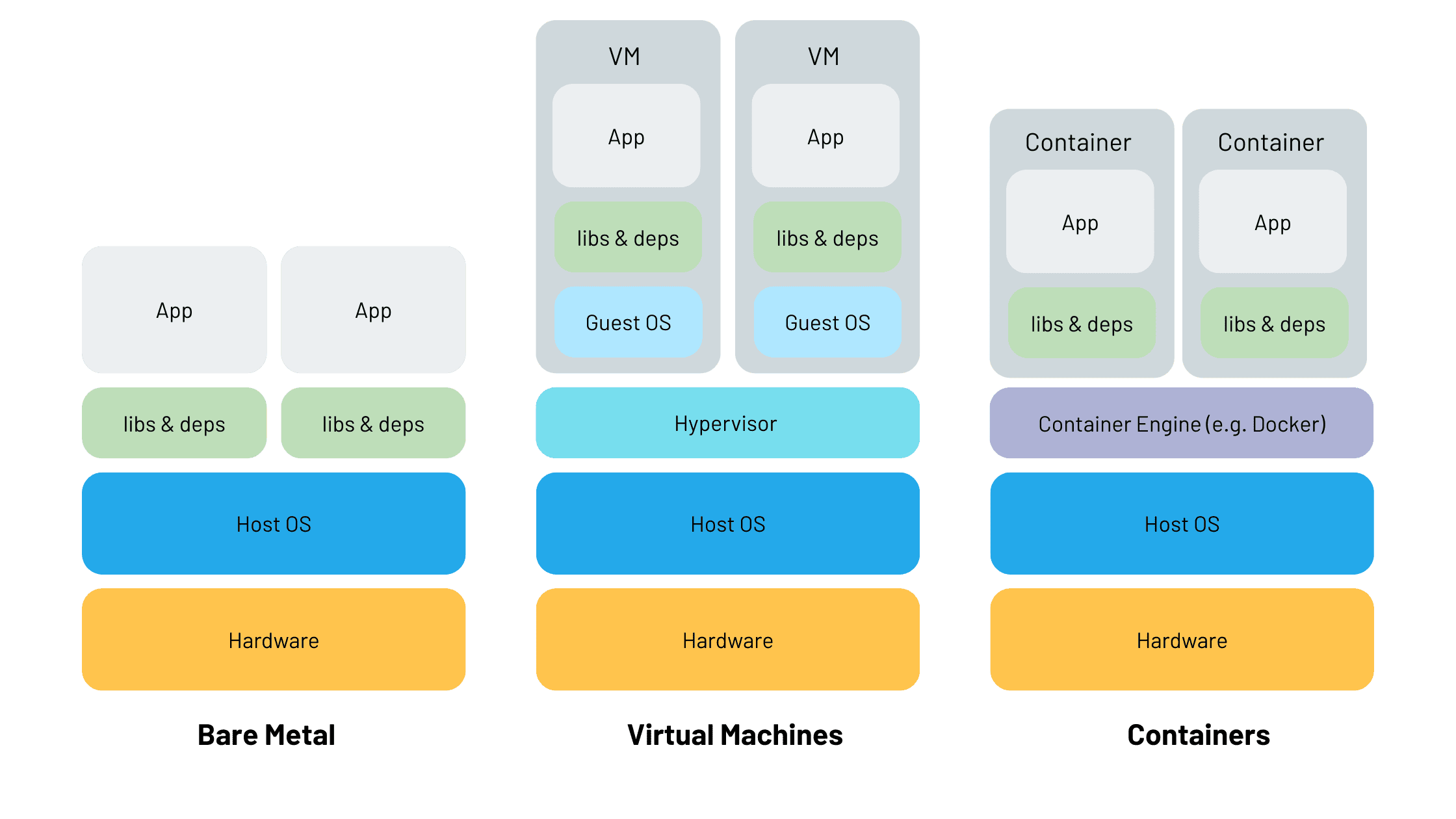
That works, but it comes with trade-offs. Bare metal is expensive, slower to provision, and you lose some of the elasticity that makes EC2 attractive in the first place.
With this new capability, standard virtualized EC2 instances — powered by the Nitro system — can now expose hardware virtualization extensions (like Intel VT-x) to the guest OS. That means your EC2 instance itself can act as a hypervisor, and you can run multiple isolated VMs inside it.
So instead of choosing between flexibility and control, you now get a middle ground: controlled virtualization without going fully bare metal.
A Simple Use Case: Isolated Test Environments Per Customer
Consider a team building a multi-tenant SaaS platform with strict data isolation requirements.
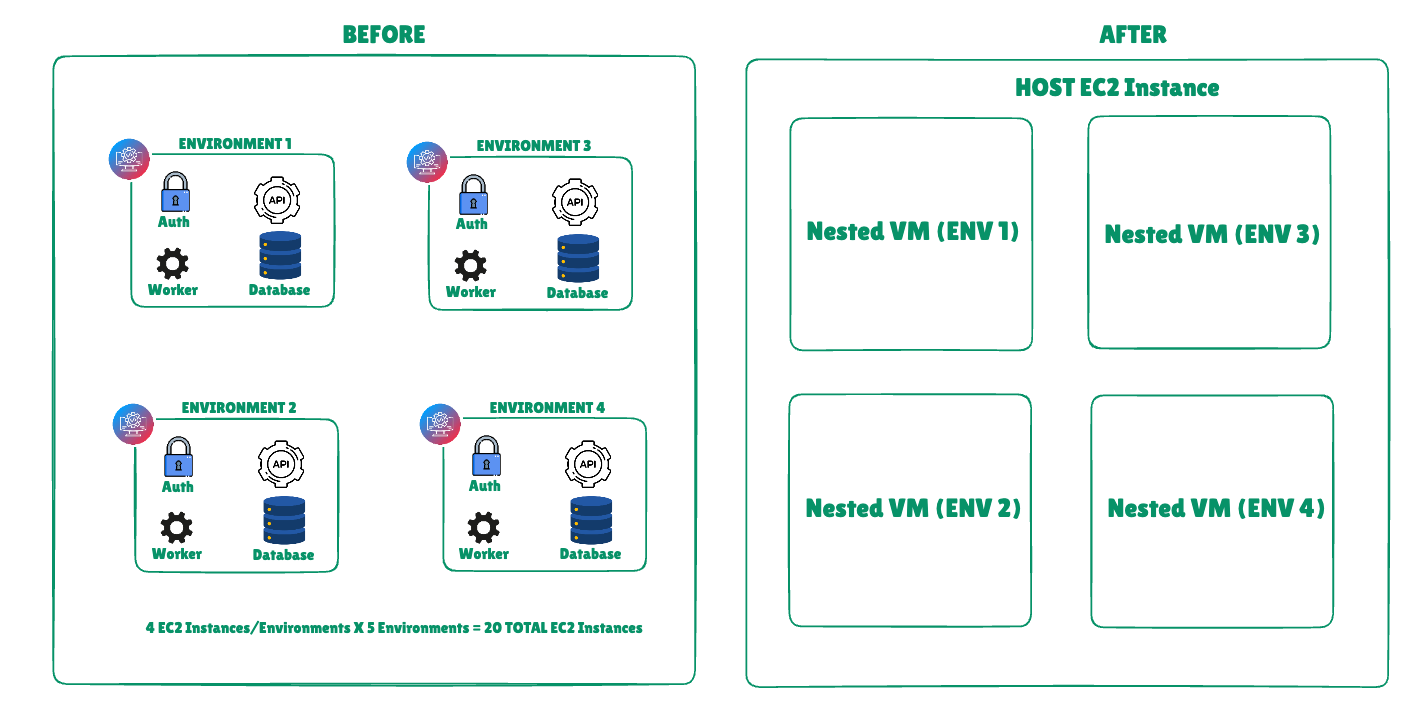
Before this change, if you wanted strong isolation guarantees for testing or pre-production validation, you’d typically provision separate EC2 instances per environment. For something moderately complex — say auth, API, worker, and database — you’re easily looking at four instances per environment.
If you needed five such environments for parallel testing, that’s twenty EC2 instances. Even at a modest ~$70/month per instance, you’re at ~$1,400/month.
With nested virtualization, you can collapse this.
You provision a single larger instance — say ~$140/month — and run five isolated environments inside it as separate VMs. Each environment has its own network namespace, disk, and runtime boundary. From the application’s perspective, it behaves like a dedicated deployment.
Now you’re looking at ~$140 instead of ~$1,400. Even if you double the instance size for headroom, you’re still saving ~70–80%.
The cost story is obvious, but the more interesting shift is in how you define isolation.
Security: This Is Where It Gets Interesting
Most teams think about isolation at the infrastructure level: separate EC2 instances, separate VPC constructs, separate IAM roles. That’s the standard AWS model.
Nested virtualization introduces a second layer of isolation inside the instance boundary.
You now have:
AWS Nitro hypervisor isolating your EC2 instance from others
Your own hypervisor isolating internal VMs from each other
This creates a defense-in-depth model that is closer to how on-prem virtualization stacks were traditionally designed.
From a security perspective, this gives you a few practical advantages:
First, you can contain blast radius more tightly. If one service or environment inside your instance is compromised, the attacker is still confined to that inner VM. They don’t automatically get lateral access to sibling environments, even though they share the same EC2 instance.
Second, you can enforce stricter boundaries for untrusted workloads. For example, if you’re running third-party code, customer-specific logic, or experimental features, you can place them in dedicated inner VMs rather than trusting process-level or container-level isolation.
Third, this simplifies certain compliance narratives. Instead of reasoning about distributed infrastructure across many EC2 instances, you can present a model where each tenant or test environment runs in a logically and hypervisor-isolated unit, even if physically co-located. For some audit scenarios, that’s easier to explain and validate.
There’s also an operational security angle. Because everything is contained within a single outer instance, you reduce the surface area exposed to the network — fewer public endpoints, fewer security group permutations, fewer moving pieces to misconfigure.
Of course, this doesn’t replace AWS-native isolation primitives. If anything, it complements them. You’re effectively layering your own isolation model on top of AWS’s.
Where This Fits (and Where It Doesn’t)
This model is not a replacement for production-grade, horizontally scaled systems. If you’re running latency-sensitive workloads or need independent scaling per service, distributing across EC2 instances (or containers) is still the right approach.
But for controlled environments — testing, simulation, sandboxing, customer-specific deployments, or even certain regulated workloads — this is a meaningful new tool.
It also brings AWS closer to parity with other cloud providers and platforms like DigitalOcean, which have long supported simpler VM-in-VM setups for developer-oriented use cases. The difference now is that AWS is enabling this within its high-performance Nitro-based ecosystem, which makes it viable for more serious workloads.
The Bigger Picture
What this really changes is how you think about an EC2 instance.
It’s no longer just a unit of compute. It can now be treated as a portable infrastructure container, capable of hosting multiple fully isolated systems within it.
That opens up new patterns:
Per-customer isolated stacks without per-customer infrastructure sprawl
High-fidelity testing environments that don’t require full infra duplication
Safer execution zones for untrusted or experimental workloads
In other words, AWS is giving you the option to move one level up the abstraction stack — from managing machines to embedding entire environments inside a machine.
And for the right use cases, that’s a pretty big deal.
If you found this breakdown useful, please consider sharing the post—it helps me stay motivated to write more engineering deep dives!
Consider subscribing if you want to stay hooked to latest updates happening in the tech world!